
OTP input in React: use one real input, not six
Six separate boxes break paste, autofill and screen readers. Build a six-digit code input in React from a single input with the boxes drawn underneath it.
5 min read
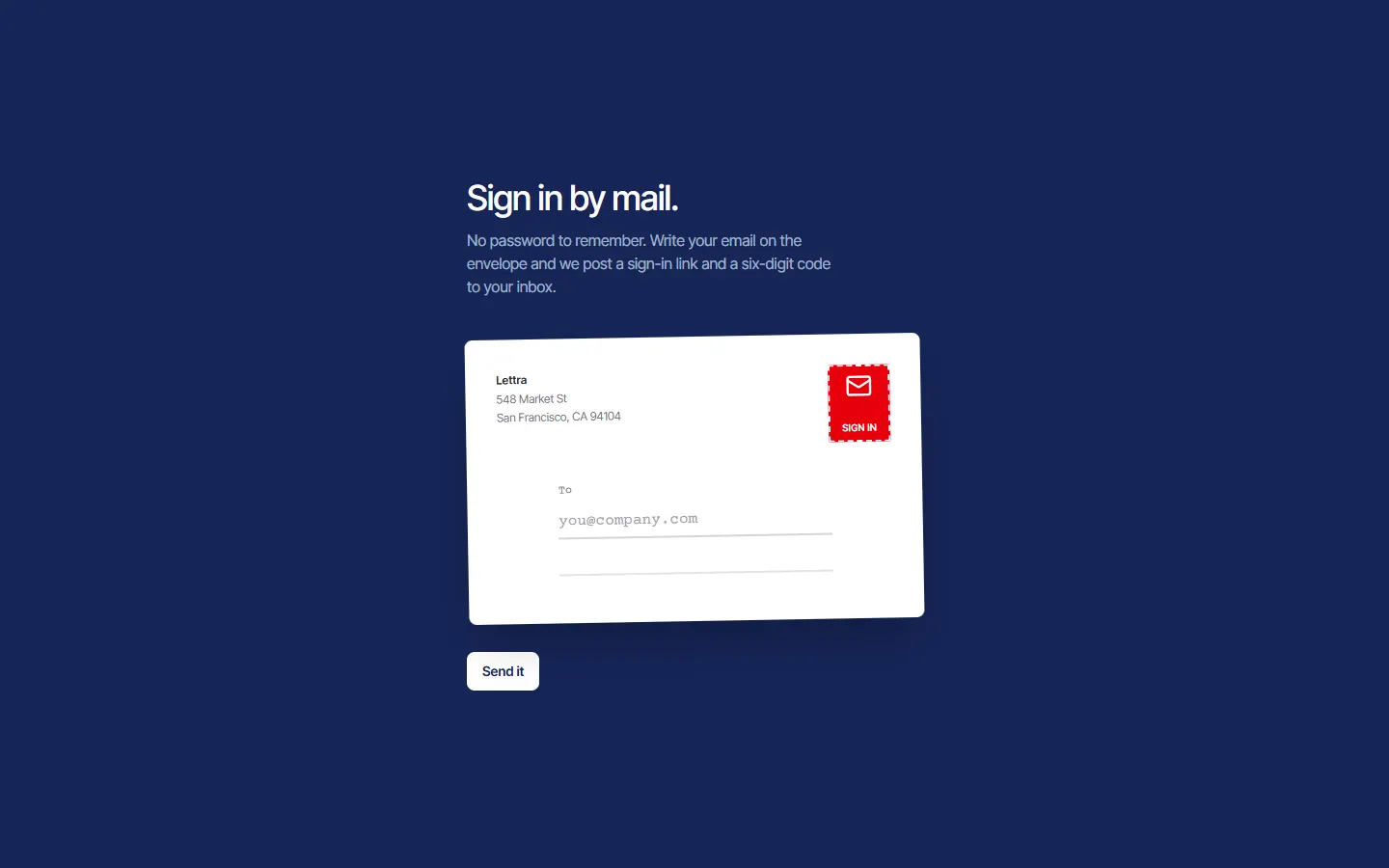
The six-box verification code is everywhere, and most implementations are six inputs wired together with focus handlers. It looks right and behaves badly. There is a simpler way to build it that keeps the look and fixes the behavior: one real input, with the six boxes drawn underneath.
What goes wrong with six inputs
- Paste: the code lands in the first box and stops, unless you write a paste handler that splits it.
- Autofill from a text message: phones offer the code above the keyboard, but only fill the field that asked for it. With six fields, five stay empty.
- Backspace: you need custom code to move back a box, and it usually has an off-by-one bug.
- Screen readers announce six unlabeled text fields, not one code.
- Password managers and browser extensions get confused by a row of one-character fields.
Every one of those is something a single input does correctly for free.
One input, six drawn boxes
Render six boxes as plain elements, hidden from assistive technology, each showing one character of the value. Then lay one real input over the whole strip, absolutely positioned, with transparent text and a transparent caret. The visitor clicks anywhere on the strip and types. The boxes update because they are drawn from the input's value.
The box after the last typed character gets the focus style, so it still feels like moving from box to box.
src/registry/login/postmark/stamp-code.tsx
"use client";

import { motion } from "motion/react";
import { cn } from "@/lib/utils";

export const CODE_LENGTH = 6;

interface StampCodeProps {
  id: string;
  label: string;
  value: string;
  onChange: (code: string) => void;
  isWrong: boolean;
  isDisabled: boolean;
}

// The six-digit code as a strip of postage stamps. One real input lies over the whole strip, so pasting, the
// keyboard's one-time-code suggestion and screen readers all work; each stamp shows its digit, and the next
// empty one is marked.
export function StampCode({ id, label, value, onChange, isWrong, isDisabled }: StampCodeProps) {
  return (
    <motion.div animate={isWrong ? { x: [0, -8, 8, -5, 5, 0] } : { x: 0 }} transition={{ duration: 0.4 }} className="relative w-fit">
      <label htmlFor={id} className="sr-only">
        {label}
      </label>
      <div aria-hidden className="flex gap-1.5 sm:gap-2.5">
        {Array.from({ length: CODE_LENGTH }, (_, index) => (
          <div
            key={index}
            className={cn(
              "relative grid h-14 w-10 place-items-center rounded-xs bg-white p-1 shadow-md sm:h-16 sm:w-12",
              index === value.length && !isDisabled && "outline-2 outline-offset-2 outline-white",
            )}
          >
            <span
              className={cn(
                "grid size-full place-items-center border border-dashed font-courier text-xl font-bold sm:text-2xl",
                isWrong ? "border-red-300 text-red-700" : "border-blue-200 text-blue-950",
              )}
            >
              {value[index]}
            </span>
          </div>
        ))}
      </div>
      <input
        id={id}
        value={value}
        onChange={(event) => onChange(event.target.value.replace(/\D/g, "").slice(0, CODE_LENGTH))}
        inputMode="numeric"
        autoComplete="one-time-code"
        maxLength={CODE_LENGTH}
        disabled={isDisabled}
        aria-invalid={isWrong}
        className="absolute inset-0 size-full cursor-text rounded-xs text-transparent caret-transparent outline-none focus-visible:outline-4 focus-visible:outline-offset-4 focus-visible:outline-white/15"
      />
    </motion.div>
  );
}
The four attributes that matter
- autoComplete="one-time-code" lets phones offer the code from a text message, and tells password managers what the field is.
- inputMode="numeric" opens the number keypad without the drawbacks of type="number", which drops leading zeros and adds spinner arrows.
- maxLength set to the code length, plus stripping non-digits in the change handler, so a pasted "314 159" still works.
- A real label. Ours is visually hidden, and the input also carries aria-invalid when the code is wrong.
Submit when it is complete, and fail kindly
With a code there is no reason to make people press a button. When the value reaches six digits, verify it. While the check runs, disable the input.
If the code is wrong, shake the strip, show a message in a role="alert" element so it is announced, clear the value and put the input back so they can type again. Always offer a way to resend the code and a way to change the email address. Those two links rescue most failed sign-ins.
src/registry/login/postmark/login-postmark.tsx
"use client";

import { useState, type FormEvent, type ReactNode } from "react";
import { AnimatePresence, motion } from "motion/react";
import { usePrefersReducedMotion } from "@/hooks/use-prefers-reduced-motion";
import { EASE_OUT } from "@/lib/motion";
import { cn } from "@/lib/utils";
import { wait } from "../shared/wait";
import { Envelope, type Postmark } from "./envelope";
import { CODE_LENGTH, StampCode } from "./stamp-code";

type Step = "address" | "posting" | "code" | "checking" | "in";

// How long the postmark sits on the envelope before the letter leaves.
const POSTMARK_MS = 900;
const WRONG_MS = 600;
const BUTTON =
  "inline-flex h-10 items-center justify-center rounded-md bg-white px-4 text-sm font-semibold text-blue-950 transition-colors duration-150 hover:bg-blue-100 focus-visible:outline-2 focus-visible:outline-offset-2 focus-visible:outline-white disabled:opacity-70";
const LINK =
  "rounded-sm font-medium text-white underline decoration-white/30 underline-offset-4 hover:decoration-white focus-visible:outline-2 focus-visible:outline-offset-2 focus-visible:outline-white";

export interface LoginPostmarkProps {
  // The brand's mark for the postage stamp.
  stamp: ReactNode;
  sender: { name: string; lines: string[] };
  // The office on the postmark's rim, in capitals.
  origin: string;
  address: { title: string; description: string; email: string; placeholder: string; submit: string; sending: string; to: string; stampValue: string };
  // {email} in the description is replaced with the address the letter went to.
  code: { title: string; description: string; label: string; error: string; resend: string; change: string; hint?: string };
  success: { title: string; description: string; action: { label: string; href: string } };
  // Sends the link and code. Verifies the code: true lets the visitor in.
  onSend?: (email: string) => Promise<void>;
  onVerify?: (code: string) => Promise<boolean>;
  className?: string;
}

const stampTime = (now: Date): Postmark => ({
  date: now.toLocaleDateString("en-US", { month: "short", day: "numeric" }).toUpperCase(),
  time: now.toLocaleTimeString("en-US", { hour: "numeric", minute: "2-digit" }),
});

// A passwordless login told as a letter, on airmail blue. The visitor types their email straight onto a white
// envelope; sending it lands a postmark with today's date across the red stamp and the letter flies off. The
// six-digit code is then entered into a strip of six postage stamps, cancelled one by one when the code is right.
export function LoginPostmark({ stamp, sender, origin, address, code, success, onSend, onVerify, className }: LoginPostmarkProps) {
  const isReduced = usePrefersReducedMotion();
  const [step, setStep] = useState<Step>("address");
  const [email, setEmail] = useState("");
  const [digits, setDigits] = useState("");
  const [postmark, setPostmark] = useState<Postmark | null>(null);
  const [isWrong, setIsWrong] = useState(false);
  const pause = (ms: number) => (isReduced ? Promise.resolve() : wait(ms));

  const post = async (event: FormEvent) => {
    event.preventDefault();
    setPostmark(stampTime(new Date()));
    setStep("posting");
    await Promise.all([onSend?.(email), pause(POSTMARK_MS)]);
    setStep("code");
  };

  const enterCode = async (next: string) => {
    setDigits(next);
    setIsWrong(false);
    if (next.length < CODE_LENGTH) return;
    setStep("checking");
    const isRight = onVerify ? await onVerify(next) : true;
    if (isRight) return setStep("in");
    setIsWrong(true);
    await pause(WRONG_MS);
    setDigits("");
    setStep("code");
  };

  const startOver = () => {
    setStep("address");
    setPostmark(null);
    setDigits("");
    setIsWrong(false);
  };

  const isAddressing = step === "address" || step === "posting";
  const head = step === "in" ? success : isAddressing ? address : code;
  return (
    <div className={cn("flex min-h-svh flex-col overflow-hidden bg-blue-950 font-inter-tight text-white", className)}>
      <main className="mx-auto flex w-full max-w-lg flex-1 flex-col justify-center gap-10 px-5 py-16">
        <div aria-live="polite">
          <h1 className="text-3xl font-medium tracking-tight sm:text-4xl">{head.title}</h1>
          <p className="mt-3 max-w-sm text-base text-pretty text-blue-100/70">{head.description.replace("{email}", email)}</p>
        </div>
        <AnimatePresence mode="wait" initial={false}>
          {isAddressing ? (
            <motion.form
              key="letter"
              onSubmit={post}
              exit={isReduced ? { opacity: 0 } : { x: "115%", y: "-25%", rotate: 9, opacity: 0 }}
              transition={{ duration: 0.55, ease: EASE_OUT }}
              className="flex flex-col gap-8"
            >
              <Envelope id="postmark-email" email={email} onEmailChange={setEmail} isDisabled={step === "posting"} stamp={stamp} sender={sender} labels={address} origin={origin} postmark={postmark} />
              <button type="submit" disabled={step === "posting"} className={cn(BUTTON, "w-full sm:w-fit")}>
                {step === "posting" ? address.sending : address.submit}
              </button>
            </motion.form>
          ) : (
            <motion.div key="code" initial={isReduced ? false : { opacity: 0, y: 16 }} animate={{ opacity: 1, y: 0 }} transition={{ duration: 0.35, ease: EASE_OUT }} className="flex flex-col gap-6">
              <StampCode id="postmark-code" label={code.label} value={digits} onChange={enterCode} isWrong={isWrong} isDisabled={step !== "code"} />
              {isWrong && (
                <p role="alert" className="text-sm text-red-300">
                  {code.error}
                </p>
              )}
              {step === "in" ? (
                <a href={success.action.href} className={cn(BUTTON, "w-fit")}>
                  {success.action.label}
                </a>
              ) : (
                <p className="flex flex-wrap gap-x-6 gap-y-2 text-sm text-blue-100/60">
                  <button type="button" onClick={() => onSend?.(email)} className={LINK}>
                    {code.resend}
                  </button>
                  <button type="button" onClick={startOver} className={LINK}>
                    {code.change}
                  </button>
                  {code.hint}
                </p>
              )}
            </motion.div>
          )}
        </AnimatePresence>
      </main>
    </div>
  );
}
Styling it your way
Because the boxes are just drawn elements, they can be anything. In our magic-link login they are six postage stamps, to go with an envelope you type your email onto. Squares, underlines or circles all work the same. The input on top never changes.
More articles
7 min read
How we built a login page where the password cuts a keyA React login page that turns the password into a brass key as you type: the hash behind the cuts, the SVG that animates them, and the mistakes we made first.
8 min read
A scroll-story landing page in React: one pinned stage, one clockHow to build a pinned scroll story in React with Motion: sticky positioning, one scroll-driven clock, and a single object that changes state scene by scene.